



| Place of Origin: | China (Mainland) |
|---|---|
| Model Number: | XHYEX07 |
| Brand Name: | Neutral products |
Quick Details
Specifications
Features
L HDMI1.4a version is supported
Support 3D video format
L Support the highest resolution of 1080P / 60Hz
L Supports a maximum rate of 3.4 Gbps, and a TMDS clock with a maximum bandwidth of 340 Mhz
L Support 8/10/12 bit color
L Support the use of standard AWG26 cable, input transmission distance of 10 meters, the output transmission distance of 15 meters
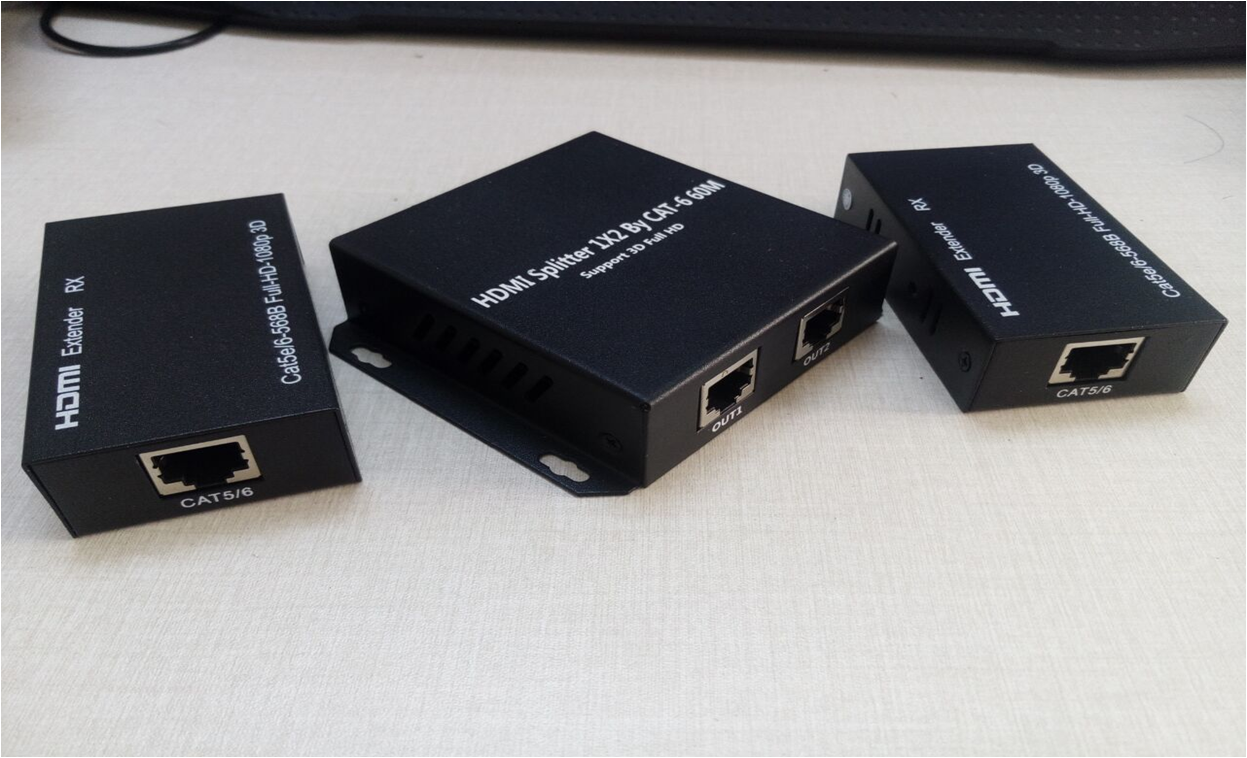
L Supports two CAT-6 (shielded) cables to extend the output
L Requires 5V / 1A power adapter
Connection and operation:
1. Use an HDMI cable to connect the source to the transmitter's transmitter, up to a maximum of 15 meters
2. Connect an HDMI cable to the receiver side of the extender with a cable length of up to 20 meters
3. Use a cat5e cable or cat6 cable (recommended) instead of the HDMI cable to connect the transmitter's transmitter to the receiver, up to 60 meters
4. Connect the transmitter and receiver to the power supply, and the POWER LED will light red
Product Specifications:
CAT5e or CAT6 cable between receiver and transmitter............................................. up to 60 meters
HDMI input............................................ 24/50 / 60fs / 1080p / 1080i / 720p / 576p / 576i / 480p / 480i
DTS-HD / Dolby-TrueHD / DTS / Dolby-AC3 / DSD support audio format input.
HDMI output.................................... 24/50 / 60fs / 1080p / 1080i / 720p / 576p / 576i / 480p / 480i
Support for audio format output..........................................................................................................................................
Maximum Transmission Bandwidth............................................................................... 340MHz
Maximum transfer rate.................................................................................... 3.4Gbps
Input video signal................................................................................... 0.5 to 1.5Volts p-p
Output DDC signal.............................................................................. 5Volts p-p (TTL)
Input HDMI cable length.................................................. ≤15m AWG26 Standard HDMI cable
Output HDMI cable length.................................................. ≤20m AWG26 Standard HDMI cable
Maximum operating current TX............................................................................................... 460mA
Maximum operating current RX.............................................................................................. 150mA
Power Adapter Specifications................................. AC input (50HZ, 60HZ) 100V-240V; DC output 5V / 1A
Operating temperature range......................................................................... (-15 to + 55 ° C)
Operating Humidity Range.................................................................................. 5 to 90% RH (non-condensing)
TX Dimensions (L x W x H).................................................................. 93x80x25 (mm)
TX weight.............................................................................................................. 164g
RX Dimensions (L x W x H).......................................................... 80X45X23 (MM)
RX Weight.......................................................................................................................112g
Package Attachments:
1. TX Transmitter X1, RX Receiver X2
2. 5V / 1A power adapter x3
3. User Manual
Precautions:
Please use the proper and proper maintenance, to ensure product performance and normal work.
1. Keep away from moisture, high temperature, dust, corrosive and oxidative gas environment to avoid damage.
2. All components should avoid strong vibration, not collision, percussion, fall, so as not to damage.
3. Do not touch the power plug of the machine with wet hands
4. When unplugging the adapter from the power outlet, hold the plug and do not pull on the power cord.
5. Please turn off the power when the machine is not in use (unplug the power adapter when not in use for a long time)
6. Do not open the cover, do not touch any device in the machine.
7. the power adapter supplied by the manufacturer or approved by the manufacturer must be used
Before powering on, check whether the cable is normal. Make sure all the interfaces are connected properly. Common fault diagnosis and treatment are as follows:
Serial number
Failure phenomenon
Causes and solutions
1
without electricity
1, check the power plug is properly inserted into the power outlet.
2, check the power is turned on.
2
No images
1. Make sure the TV is on and connected to the unit.
2, the input signal source is turned on and connected well.
3, check the system connection status.
4, check the cable is intact.
5, wire quality (HDMI cable requirements meet the HDMI standard).
3
the image is blurred
1, the connection port to reconnect to prevent the socket interface is bad
2, wire quality (HDMI cable requirements meet the HDMI standard)
L HDMI1.4a version is supported
Support 3D video format
L Support the highest resolution of 1080P / 60Hz
L Supports a maximum rate of 3.4 Gbps, and a TMDS clock with a maximum bandwidth of 340 Mhz
L Support 8/10/12 bit color
L Support the use of standard AWG26 cable, input transmission distance of 10 meters, the output transmission distance of 15 meters
L Supports two CAT-6 (shielded) cables to extend the output
L Requires 5V / 1A power adapter
Connection and operation:
1. Use an HDMI cable to connect the source to the transmitter's transmitter, up to a maximum of 15 meters
2. Connect an HDMI cable to the receiver side of the extender with a cable length of up to 20 meters
3. Use a cat5e cable or cat6 cable (recommended) instead of the HDMI cable to connect the transmitter's transmitter to the receiver, up to 60 meters
4. Connect the transmitter and receiver to the power supply, and the POWER LED will light red
Product Specifications:
CAT5e or CAT6 cable between receiver and transmitter............................................. up to 60 meters
HDMI input............................................ 24/50 / 60fs / 1080p / 1080i / 720p / 576p / 576i / 480p / 480i
DTS-HD / Dolby-TrueHD / DTS / Dolby-AC3 / DSD support audio format input.
HDMI output.................................... 24/50 / 60fs / 1080p / 1080i / 720p / 576p / 576i / 480p / 480i
Support for audio format output..........................................................................................................................................
Maximum Transmission Bandwidth............................................................................... 340MHz
Maximum transfer rate.................................................................................... 3.4Gbps
Input video signal................................................................................... 0.5 to 1.5Volts p-p
Output DDC signal.............................................................................. 5Volts p-p (TTL)
Input HDMI cable length.................................................. ≤15m AWG26 Standard HDMI cable
Output HDMI cable length.................................................. ≤20m AWG26 Standard HDMI cable
Maximum operating current TX............................................................................................... 460mA
Maximum operating current RX.............................................................................................. 150mA
Power Adapter Specifications................................. AC input (50HZ, 60HZ) 100V-240V; DC output 5V / 1A
Operating temperature range......................................................................... (-15 to + 55 ° C)
Operating Humidity Range.................................................................................. 5 to 90% RH (non-condensing)
TX Dimensions (L x W x H).................................................................. 93x80x25 (mm)
TX weight.............................................................................................................. 164g
RX Dimensions (L x W x H).......................................................... 80X45X23 (MM)
RX Weight.......................................................................................................................112g
Package Attachments:
1. TX Transmitter X1, RX Receiver X2
2. 5V / 1A power adapter x3
3. User Manual
Precautions:
Please use the proper and proper maintenance, to ensure product performance and normal work.
1. Keep away from moisture, high temperature, dust, corrosive and oxidative gas environment to avoid damage.
2. All components should avoid strong vibration, not collision, percussion, fall, so as not to damage.
3. Do not touch the power plug of the machine with wet hands
4. When unplugging the adapter from the power outlet, hold the plug and do not pull on the power cord.
5. Please turn off the power when the machine is not in use (unplug the power adapter when not in use for a long time)
6. Do not open the cover, do not touch any device in the machine.
7. the power adapter supplied by the manufacturer or approved by the manufacturer must be used
Before powering on, check whether the cable is normal. Make sure all the interfaces are connected properly. Common fault diagnosis and treatment are as follows:
Serial number
Failure phenomenon
Causes and solutions
1
without electricity
1, check the power plug is properly inserted into the power outlet.
2, check the power is turned on.
2
No images
1. Make sure the TV is on and connected to the unit.
2, the input signal source is turned on and connected well.
3, check the system connection status.
4, check the cable is intact.
5, wire quality (HDMI cable requirements meet the HDMI standard).
3
the image is blurred
1, the connection port to reconnect to prevent the socket interface is bad
2, wire quality (HDMI cable requirements meet the HDMI standard)