



| Warranty: | 1Years |
|---|---|
| Brand Name: | Launch |
| Certification: | CE FCC ROHS |
| Voltage: | 12V |
| Type: | Code Reader |
| Model Number: | Launch Creader 519 |
| Place of Origin: | China (Mainland) |
| Applicable Models: | Global OBDII(1996 to Present) |
| Power: | 9w |
| Product Name: | Launch Creader 519 Code Reader |
| Language: | Spanish, English, French |
| Software Version: | Newest Version |
| Hardware Version: | Newest Version |
| Original Software Update: | Yes |
| Special Features: | by Obdii Connector |
| Support Vehicle: | Support OBD II Car Models |
| Special Function: | Meets All Obdii/Eobd Protocols |
| Update: | Free Update All Life |
Quick Details
Specifications
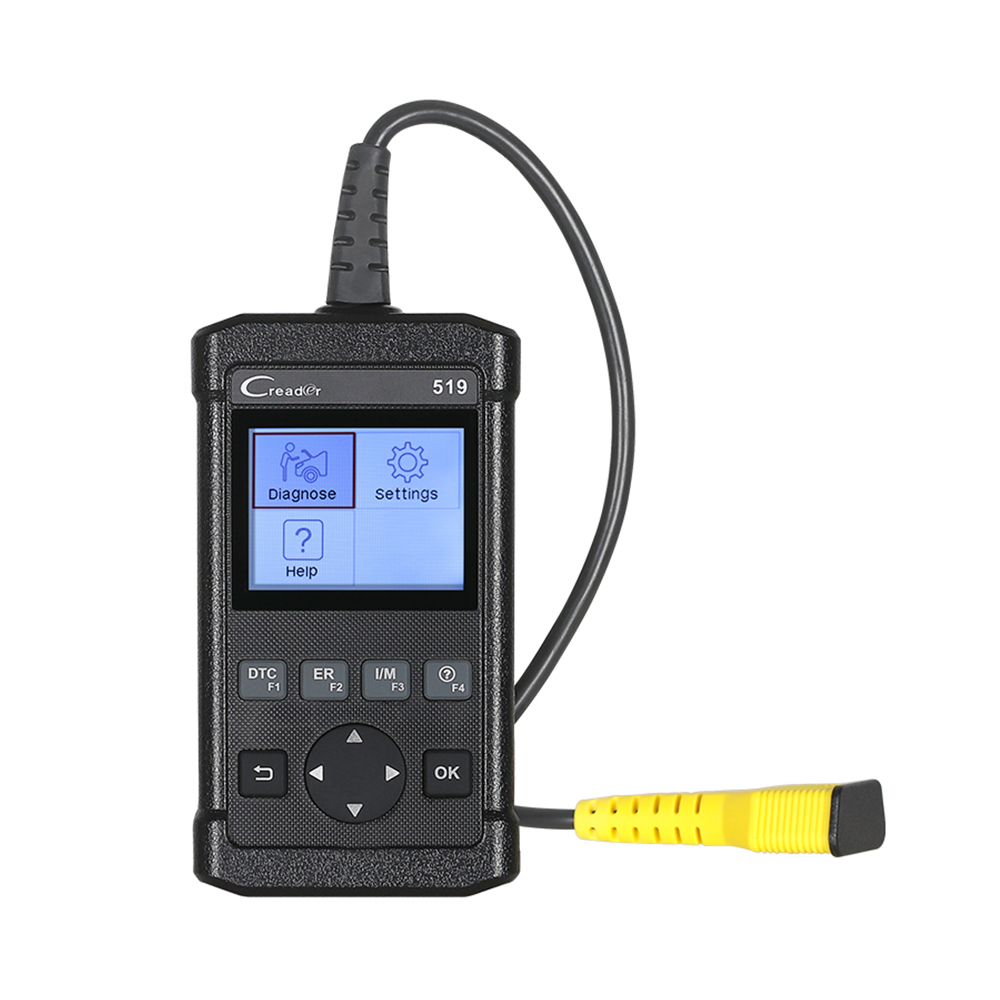
Car DIY Scanner Launch CReader 519 OBD2 Code Reader Read Vehicle Information Diagnostic Tools for cars for VW/for BMW/for BENZ
Product Introduction:
CReader 519 provides full OBDII/EOBD diagnostic functions and meets protocols such as ISO9141-2, ISO14230-4,SAEJ1850, and ISO15765-4. It features a 2.8-inch color display, graphical data streams, and USB interface internet Update, which facilitates car maintenance.
Highlight:
the FEATURES YOU NEED: 2.8"Color LCD display; View freeze frame data; View graphical and numeric data
Streams; Sensor tests; Monitored systems tests;No batteries, supply power through OBDII cable.
THOUGHTFUL DESIGN: All-in-one screen and easy-to-use hotkeys make the CReader 5001 an ideal tool for the
DIYer and professional technicians alike.
POWERFUL FUNCTIONS: Full OBDII/EOBD Diagnostic Functions. Read & Clear DTCs, I/M Readiness Status,
Read Freeze Frame, Read Datastream, Read Vehicle Information, O2 Sensor Test, On board Monitored systems
Test (mode 6), Read pending DTCs, Read permanent DTCs, Turns off Malfunction Indicator Light (MIL).
QUALITY GUARANTEE: Multilingual Support (English, French, Spanish); Instructions with two languages
(English and Spanish). the tool can be update via USB cable.It is running the latest software, can be used without update.
Languages: English, Spanish, French, Russian, German, Portuguese, Japanese,Chinese
Product Functions:
1. OBD full functions:
1) Read dynamic data streams and MIL
2) Read readiness status
3) Query freeze frame data
4) Read current DTCs
5) Clear DTCs
6) O2 sensor test
7) on-board monitor test(mode 6)
8) Read pending DTCs
9) Read vehicle information
10) Read permanent DTCs
2. Color and graphical display of data streams
3. Query DTCs
4. Free update of USB interface via internet
5. Multilingual support
6. the same function as Autel AL519
Specifications:
Register & Update
the tool can be updated via USB cable.
Note: make sure the PC has an Internet connection.
1. Go to and download the update tool to the computer.
2. Decompress and install it on your computer (compatible with Windows XP, Windows7, Windows8 & Windows10)
3. after installation, connect one end of the USB cable to the USB port of PC, and the other end to the tool.
4. If a newer version is found, a screen similar to Fig A will appear.
5. Launch the update tool on your PC, [Device upgrade] box will appear.
6. Choose the desired interface language and then click [Device Update] to enter update center.
7. Choose the software version and then click [Update] to start updating.
8. Once update is complete, a 'Upgrade success' message box will pop up. Your tool is now ready for use.
Product Introduction:
CReader 519 provides full OBDII/EOBD diagnostic functions and meets protocols such as ISO9141-2, ISO14230-4,SAEJ1850, and ISO15765-4. It features a 2.8-inch color display, graphical data streams, and USB interface internet Update, which facilitates car maintenance.
Highlight:
the FEATURES YOU NEED: 2.8"Color LCD display; View freeze frame data; View graphical and numeric data
Streams; Sensor tests; Monitored systems tests;No batteries, supply power through OBDII cable.
THOUGHTFUL DESIGN: All-in-one screen and easy-to-use hotkeys make the CReader 5001 an ideal tool for the
DIYer and professional technicians alike.
POWERFUL FUNCTIONS: Full OBDII/EOBD Diagnostic Functions. Read & Clear DTCs, I/M Readiness Status,
Read Freeze Frame, Read Datastream, Read Vehicle Information, O2 Sensor Test, On board Monitored systems
Test (mode 6), Read pending DTCs, Read permanent DTCs, Turns off Malfunction Indicator Light (MIL).
QUALITY GUARANTEE: Multilingual Support (English, French, Spanish); Instructions with two languages
(English and Spanish). the tool can be update via USB cable.It is running the latest software, can be used without update.
Languages: English, Spanish, French, Russian, German, Portuguese, Japanese,Chinese
Product Functions:
1. OBD full functions:
1) Read dynamic data streams and MIL
2) Read readiness status
3) Query freeze frame data
4) Read current DTCs
5) Clear DTCs
6) O2 sensor test
7) on-board monitor test(mode 6)
8) Read pending DTCs
9) Read vehicle information
10) Read permanent DTCs
2. Color and graphical display of data streams
3. Query DTCs
4. Free update of USB interface via internet
5. Multilingual support
6. the same function as Autel AL519
Specifications:
| Screen |
2.8" TFT 320*240 dpi |
| Voltage range |
9-18V |
| Operating Temperature |
0~ 50 |
| Environment Temperature |
-20~70 |
| Dimension |
142mm*85mm*30 mm (5.6 *3.4*1.2) |
| Weight |
320g |
Register & Update
the tool can be updated via USB cable.
Note: make sure the PC has an Internet connection.
1. Go to and download the update tool to the computer.
2. Decompress and install it on your computer (compatible with Windows XP, Windows7, Windows8 & Windows10)
3. after installation, connect one end of the USB cable to the USB port of PC, and the other end to the tool.
4. If a newer version is found, a screen similar to Fig A will appear.
5. Launch the update tool on your PC, [Device upgrade] box will appear.
6. Choose the desired interface language and then click [Device Update] to enter update center.
7. Choose the software version and then click [Update] to start updating.
8. Once update is complete, a 'Upgrade success' message box will pop up. Your tool is now ready for use.
