



| After-sales Service Provided: | Engineers available to service machinery overseas |
|---|---|
| Warranty: | 1 year |
| Certification: | CE\FCC\ROSH |
| Brand Name: | HUACOM |
| Condition: | New |
| Weight: | 2KG |
| Dimension(L*W*H): | 160mm*140mm*20mm |
| Power(W): | 24W |
| Voltage: | 9-32V |
| Model Number: | HC730-T |
| Place of Origin: | China (Mainland) |
| CNC or Not: | Normal |
| Chipset: | MTK7621 Chipset |
| Flash\RAM: | 16MB\256MB |
| Wireless Speed: | 1800Mbps |
| Wireless Protocol: | 802.11AX/AC/N/B/G |
| Antenna: | 8 Removable External Antennas |
| System: | openWRT |
Quick Details
Specifications
1 Summary
1.1 Brief overview
this document describes the electrical characteristics, RF performance, dimensions and application environment of theHC730-T. under the introduction of this document, end users or developers can quickly understand the hardware functions ofHC730-T.
HC730-T is a 5G/4G+WIFI6 home CPE router. It accesses the Internet through 5G/4G mobile communication dial-up or 1000Mbps WAN port, and then shares the Internet network through wireless WiFi 6 and 1000Mbps wired LAN.
1.2 Reference standards
Relevant standard specifications:
LUSB3.0/USB2.0 bus standard
LPCI-Express bus standard
LSIM/USIM interface standard
LIEEE802.11n/g/b/a/AC/ax
LIEEE802.3/802.3u/802.Ab
LPCI Express M.2 Specification Rev1.1
L5G/4G mobile communication standard, which is determined by the selected 5G/4G mobile communication module
3 Main features of the product
L lUsing MT7621A scheme, MIPS dual-core CPU, the main frequency is up to 880MHZ
L lUsing independent WIFI6 chip, MT7905D and MT7975D, the rate is up to 1800Mbps
L lUsing high-speed 256MB DDR3, with 16MB Nor Flash
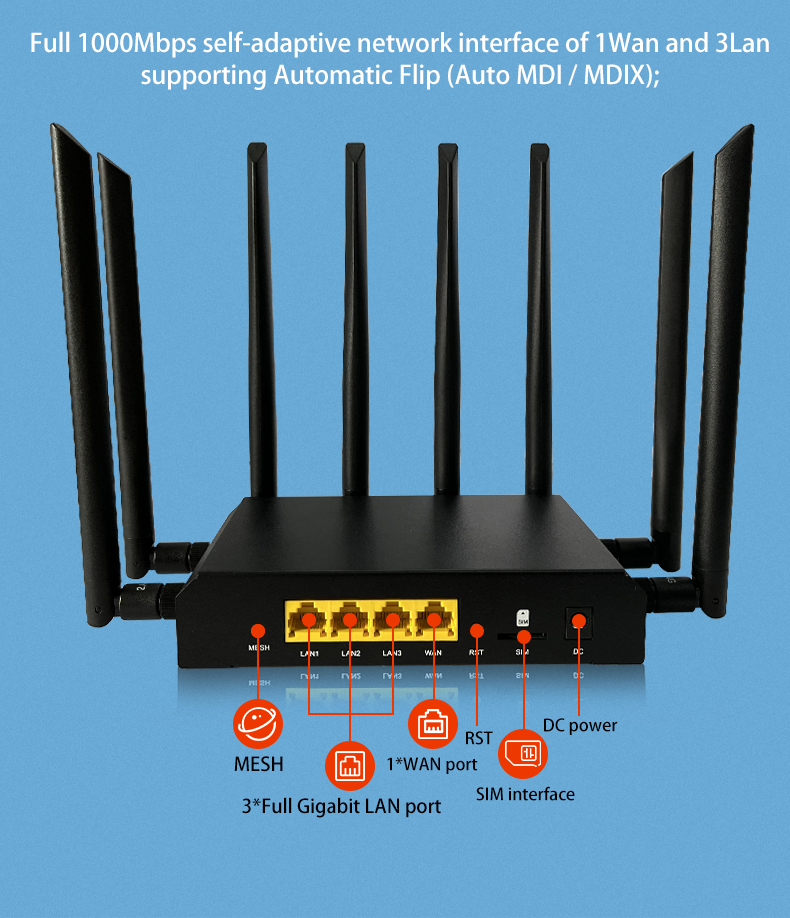
L l1WAN+3LAN 1000M adaptive network port, support auto flip (Auto MDI/MDIX)..
L lSupport "one-key flashing mode", that is, long press the reset button to enter the rescue flashing mode...
L lBuilt-in M.2/Mini-PCIE standard interface (choose one of the two), which can be used to connect to 5G/4G mobile communication modules
L lExternal standard SIM card (large card) interface and built-in eSIM (QFN-8 6mmx5mm) card interface, support SIM/USIM card
L lExternal high-gain WiFi antenna, wireless signal 360 degrees without dead angle
4 Hardware function
4.1 Introduction to the hardware interface
Ports |
WAN* 1,1000Mbps(Auto MDI/MDIX) IEEE 802.3/802.3u/802.Ab |
LAN*3,1000Mbps(Auto MDI/MDIX) IEEE 802.3/802.3u/802.Ab | |
SIM slot |
Spring type SIM slot*1, QFN-8(6mmx5mm) eSIM*1, SupportSIM/USIM |
Power adapter |
DC5.0*2.1MM slot |
Button |
Reset button* 1, MESH button*1 |
Antennas |
Onmidirectional External 5dbi 2.4G antennas*2 |
Onmidirectional External 5dbi 5.8G antennas*2 | |
Onmidirectional External 5dbi 5G/4G antennas(5G antennas* 4, 4G antennas*2) |
4.2 Introduction to indicator lights
MESH LED |
1. the red light is on during the boot process, the boot is complete, the red light is off and the green light is on 2. Press the mesh button to enter the mesh pairing state, the green light flashes once a second, and the other lights are off 3. the main equipment network is normal, the green light and blue light are on at the same time (cyan) the slave device MESH is successfully connected, and the distance is longer, the green light and the red light are on at the same time (orange), the distance is suitable for the green light and the blue light is on at the same time (cyan) |
||
WAN LED |
When connecting the WAN ports, the LED light will be always on, and the LED will be flashing when there is data communication | ||
LAN1 LED |
When connecting the LAN ports, the LED light will be always on, and the LED will be flashing when there is data communication | ||
LAN2 LED |
When connecting the LAN ports, the LED light will be always on, and the LED will be flashing when there is data communication | ||
LAN3 LED |
When connecting the LAN ports, the LED light will be always on, and the LED will be flashing when there is data communication | ||
4G/5G LED |
When insert SIM card,the LED light will be always on, and the LED will be flashing when there is data communication | ||
POWR LED |
When the power supply is normal, the power indicator is always on, and it won't be on when the power supply is abnormal. | ||
4.3 Introduction to the hardware platform
Processor |
MT7621A MIPS Dual Core CPU, 880MHZ main frequency |
WiFi chipset |
MT7905D+MT7975D IEEE 802.11n/g/b/a/AC/ax, max speed up to 1800Mbps |
RAM |
DDR3 256MB |
Flash |
Nor Flash 16MB |
NAND Flash |
this hardware product is designed with a hardware watchdog function. the hardware watchdog will automatically turn on after power-on, and detect the heartbeat level output by the routing system that jumps once per second. If the routing system itself fails (such as a crash), it will also Naturally, the heartbeat level can no longer be output. At this time, if the hardware watchdog does not detect the heartbeat level within 120 seconds, it will shut down itself for 15 seconds and then restart the entire system.
When the routing system is operating normally, but the 5G/4G module dialing is abnormal, the routing system will control the power supply of the 5G/4G module through GPIO and let the module automatically restart to fix the 5G/4G dialing abnormal problem.
Hardware watchdog specific functions | |
Routing system is abnormal |
Module dialing abnormal |
Restart the whole system |
Only restart the module |
5 5G/4G mobile communication function
this product has a built-in M.2/MiniPCIE interface, which can be used to expand 5G/4G mobile communication functions. the built-in M.2/PCIE interface supports USB3.0 and USB 2.0 buses. 5G mobile communication supports NSA or SA, and which frequency bands are specifically supported by the selected 5G module. At present, this product has completed the joint debugging with Fibocom's FM150 series modules.
6 Power supply and power consumption description
|
Testing Condition |
Minimum |
Rating |
Maximum |
Working voltage(V) |
T A = 25°C |
9 |
12 |
35 |
Absolute operating voltage(V) |
T A = 25°C |
8 |
|
36 |
Working Currency(A) |
VIN=12V,T A = 25°C |
0.3 |
0.9 |
1.5 |
Please use the standard power adapter to supply power to this product. If you do not use the standard power supply, please supply power to this product in strict accordance with the above power specifications and parameters, otherwise the product will be damaged. If the battery or vehicle power supply is used for power supply, please make anti-static and anti surge countermeasures.
7 Introduction to WiFi wireless parameters 7.1 WiFi EVM standard
|
Mode description |
Index parameter |
EVM standard(dBm) |
802.11B 11Mbps |
≤ -1 5 dB |
802.11G 54 Mbps |
≤ -25 dB | |
802.11N HT20@ MCS7 |
≤ -28 dB | |
802.11N HT40@ MCS7 |
≤ -28 dB | |
802.11AC VHT20@ MCS8 |
≤ -30 dB | |
802.11AC VHT40@ MCS9 |
≤ -32 dB | |
802.11AC VHT80@ MCS9 |
≤ -32 dB | |
802.11AX HE20@MCS 11 |
≤ -35 dB | |
802.11AX HE40@MCS 11 |
≤ -35 dB | |
802.11AX HE80@MCS 11 |
≤ -35dB |
|
Instraction |
Maximum Value |
Rating |
Minimum Value |
Working Frequency(MHz) |
|
2484 |
|
2412 |
Receiving sensitivity(dBm) |
802.11B 11Mbps |
-86 |
-87 |
-88 |
802.11G 54 Mbps |
-69 |
-71 |
-73 | |
802.11N HT20@ MCS7 |
-67 |
-69 |
-71 | |
802.11N HT40@ MCS7 |
-65 |
-67 |
-69 | |
802.11AC VHT20@ MCS8 |
-63 |
-65 |
-67 | |
802.11AC VHT40@ MCS9 |
-61 |
-63 |
-65 | |
802.11AX HE20@MCS11 |
-62 |
-64 |
-66 | |
802.11AX HE40@MCS11 |
-60 |
-62 |
-64 | |
Transmit power(dBm) |
802.11B 11Mbps |
22 |
21 |
20 |
802.11G 54 Mbps |
20 |
19 |
18 | |
802.11N HT20@ MCS7 |
19 |
18 |
17 | |
802.11N HT40@ MCS7 |
19 |
18 |
17 | |
802.11AC VHT20@ MCS8 |
18 |
17 |
16 | |
802.11AC VHT40@ MCS9 |
18 |
17 |
16 | |
802.11AX HE20@MCS11 |
17 |
16 |
15 | |
802.11AX HE40@MCS11 |
17 |
16 |
15 |
7.3 WiFi 5.8G
Compatible with IEEE 802.11 a/AC/ax, supports 20MHz, 40MHz, 80MHz, modulation method 1024-QAM / OFDMA, adopts 2T2R MU-MIMO antenna technology, and the highest connection rate is up to 1201Mbps. the following is an explanation of the power frequency, receiving sensitivity, and transmitting power of 5.8G WiFi.
|
Instraction |
Maximum Value |
Rating |
Minimum Value |
Working Frequency(MHz) |
|
5825 |
|
5180 |
Receiving sensitivity(dBm) |
802.11G 54 Mbps |
-69 |
-71 |
-73 |
802.11N HT20@ MCS7 |
-67 |
-69 |
-71 | |
802.11N HT40@ MCS7 |
-65 |
-67 |
-69 | |
802.11AC VHT20@ MCS8 |
-63 |
-65 |
-67 | |
802.11AC VHT40@ MCS9 |
-61 |
-63 |
-65 | |
802.11AC VHT80@ MCS9 |
-59 |
-61 |
-63 | |
802.11AX HE20@MCS 11 |
-57 |
-59 |
-61 | |
802.11AX HE40@MCS 11 |
-55 |
-57 |
-59 | |
802.11AX HE80@MCS 11 |
-53 |
-55 |
-57 | |
Transmit power(dBm) |
802.11G 54 Mbps |
20 |
19 |
18 |
802.11N HT20@ MCS7 |
19 |
18 |
17 | |
802.11N HT40@ MCS7 |
18 |
17 |
16 | |
802.11AC VHT20@ MCS8 |
18 |
17 |
16 | |
802.11AC VHT40@ MCS9 |
17 |
16 |
15 | |
802.11AC VHT80@ MCS9 |
16 |
15 |
14 | |
802.11AX HE20@MCS 11 |
18 |
17 |
16 | |
802.11AX HE40@MCS 11 |
17 |
16 |
15 | |
802.11AX HE80@MCS 11 |
16 |
15 |
14 |
8 Introduction to structural parameters and accessories
Weight(KG) |
TBD | |
Enclosure Size |
L*W*H=160mm*93mm*31.9mm | |
color |
Black | |
Accessories |
Power adapter |
12V/2A 1PCS |
User manual |
1PCS | |
Certificate |
1PCS | |
Ethernet cable |
Cat 5 network cable 1PCS | |
9 Product working environment requirements
Working temperature |
0℃-40℃ |
Storage temperature |
-40℃ - 70℃ |
Working humidity |
10%- 90%RH, Non condensing |
Storage humidity |
5%- 90%RH,Non condensing |
Default IP |
192.168.1.1 |
Username/password |
Root/admin |
2.4G SSID |
WIFI6-XXXXXX (x is the last 6 bits of MAC address), default no password |
5.8G SSID |
WIFI6-5G-XXXXXX (x is the last 6 bits of MAC address), default no password |
the above is the general default configuration information of the product. the WiFi SSID using our OS firmware or openwrt firmware may be different, but the default IP and web login name and password of the product remain unchanged. Please refer to the product description for other detailed software functions.